 AuraEngine
Aura Streamer: an audiophile upsampler next to your DAC, played from your phone
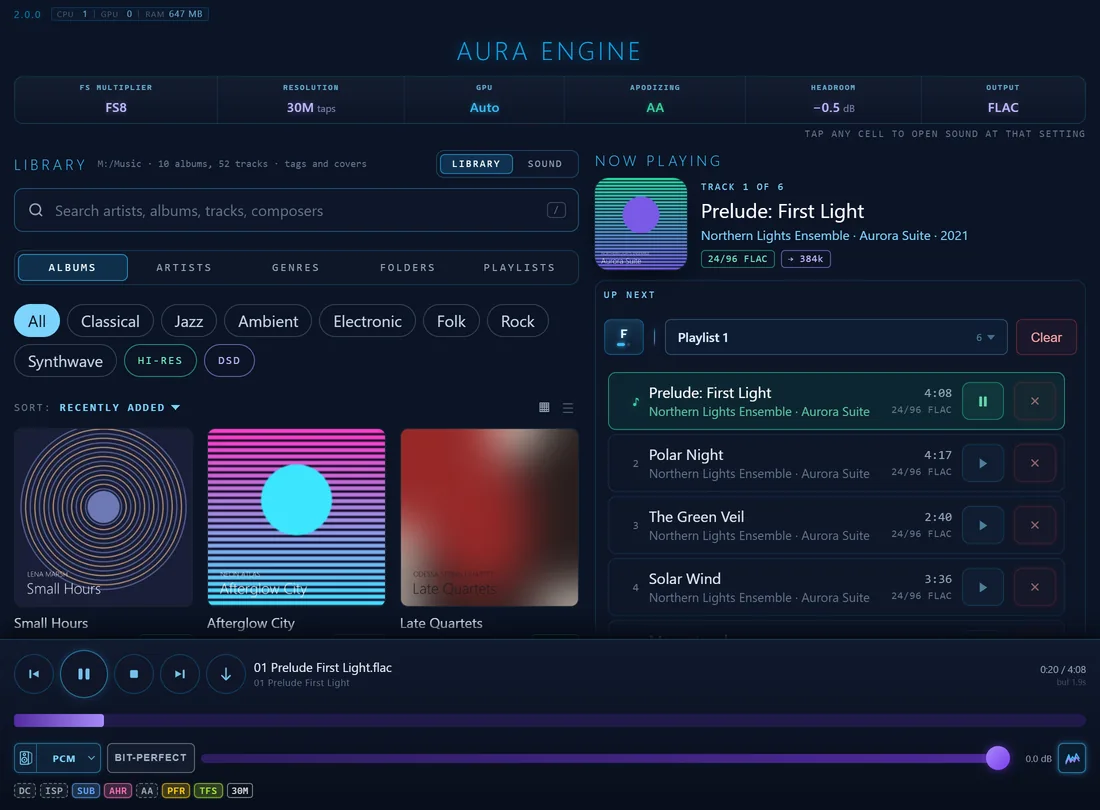
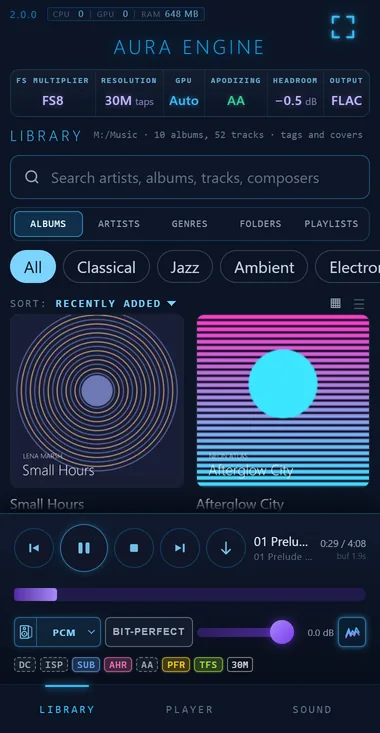
Aura Streamer is the AuraEngine FIR upsampler and music player without a screen. It runs on the computer connected to your DAC, and you choose the music and the sound from a phone, a tablet or any browser at home — or from a UPnP / OpenHome control point such as BubbleUPnP, JRiver or mConnect.
Nothing in the chain is simplified for the remote. The streamer plays through the same engine, the same filters (from 5 thousand to a billion taps), the same Hybrid-Phase engine, Aura EQ and output stage as the desktop app, with bit-perfect output and DSD up to DSD256 over DoP.
What it does
- A remote in the browser. The app’s own rack, player and queue at the computer’s address. Nothing to install on the phone; several phones and tablets show the same state.
- Your music library. Albums, artists, genres, folders and playlists, read from your music folders with their tags and covers. Hi-Res and DSD are one tap away.
- A UPnP / OpenHome renderer. Any control point on the network can play through it: play, pause, seek, volume, gapless next track and an OpenHome playlist.
- The full AuraEngine sound. Precomputed FIR filters up to 1G taps, multistage upsampling to 768 kHz, Hybrid-Phase, Aura EQ, XTC and Cue Consistency, true-peak protection.
- Bit-perfect output through WASAPI exclusive mode on Windows, ALSA
hw:on Linux and CoreAudio exclusive (hog) mode on macOS. No graphics card needed. - Updates itself from a button in the remote, after checking the release’s signature.
- Home network only. It answers only private addresses and accepts commands only from its own page.
Aura Streamer or the desktop app?
| AuraEngine app | Aura Streamer | |
|---|---|---|
| Window | Full interface on the computer | None; a console with the engine’s log |
| Controlled from | The window | A browser on any device at home; UPnP / OpenHome control points |
| Engine and rack | Player, converter and the full rack | The same engine and rack for playback |
| Library | The player’s list | Albums, artists, genres and folders from your music folders |
| Best for | Converting files, listening at the desk | A computer next to the DAC, driven from the sofa |
The two install side by side and share the same filter files.
Download
Free for personal use. Unpack the zip into a folder you can write to and start aura-streamer.
First start
- Start
aura-streamer(aura-streamer.exeon Windows) on the computer connected to the DAC. A console window prints the addresses to open; closing it stops the music. - Allow the program on private networks when the firewall asks.
- Open the address on your phone:
http://<address>(port 80, or 8088 when 80 is taken). - Filters: on Linux and macOS it finds the ones the AuraEngine app downloaded. On Windows, unpack it beside
aura-engine.exe, or let the remote download the filters it needs.
The full guide, with control points, environment variables and troubleshooting, is in the documentation and in docs/23 — Aura Streamer.
Questions
Do I need an app on my phone?
No. The remote is a web page at the streamer’s address on your home network. Add it to the home screen from the browser’s menu to open it in one tap.
Does it work with BubbleUPnP, JRiver or mConnect?
Yes. It is a UPnP AV and OpenHome renderer, shown as Aura Streamer. Discovery uses UDP 1900 and the renderer TCP 49494; allow both on private networks.
Does it play DSD and Hi-Res?
Yes. FLAC, WAV and other PCM up to the DAC’s limit, DSF and DFF, and DSD over DoP up to DSD256 live.
Do I need a powerful computer?
No. Multistage upsampling runs long filters at the source rate and a short exact interpolator does the rest, so a 30-million-tap filter plays on a few efficiency cores without a graphics card.
Can I reach it from outside my home?
Not directly, by design: it has no password and answers only private addresses. Use a VPN into your home network.